
SPIDER Automation | SATA 22-Pin 90-Degree Male to Female Adapter | Right-Angle SATA Data & Power Connector
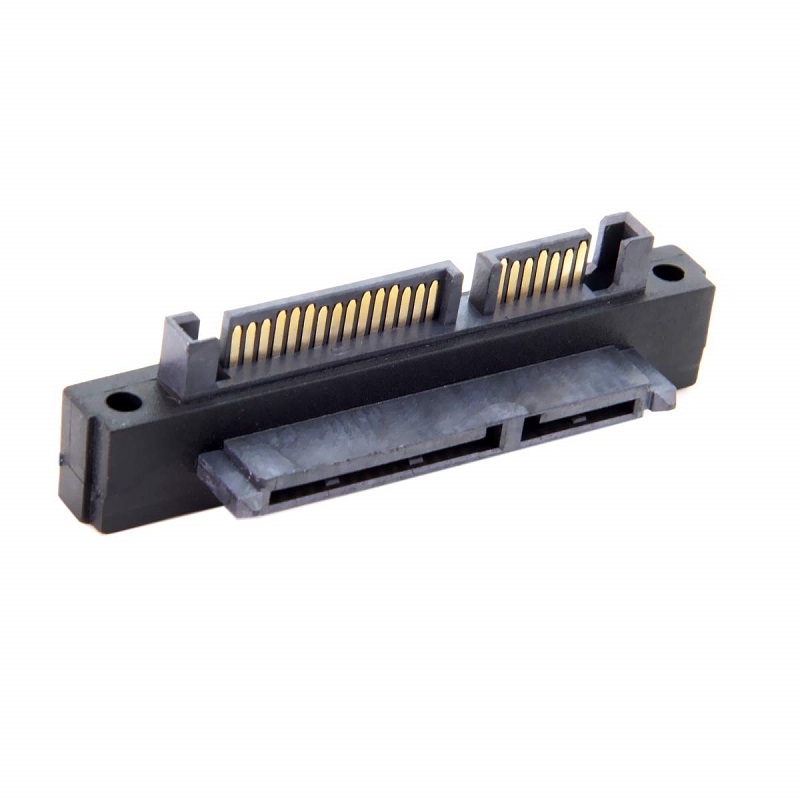
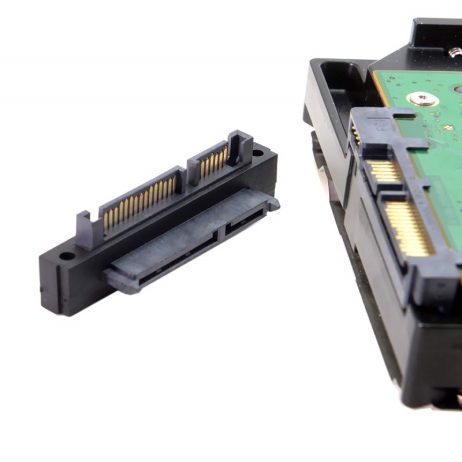
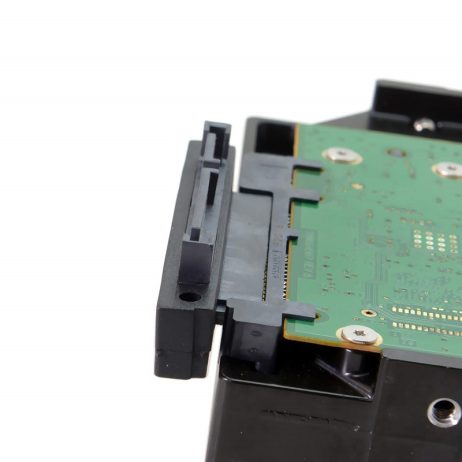
The SPIDER Automation SATA 22-Pin 90-Degree Male to Female Adapter is a connector-direction adapter designed for compatible SATA storage installations. It features a combined 7-pin SATA data and 15-pin SATA power interface, providing a 22-pin male-to-female connection in a right-angle configuration. The 90-degree arrangement changes the direction of the connected interface, helping manage connector clearance and cable routing inside desktop computer systems.
The adapter provides a direct physical connection between compatible 22-pin SATA interfaces without requiring driver installation or software configuration. Its plastic housing forms the connector body, while the male and female ends provide the corresponding interfaces for the intended connection arrangement. It is a passive connector accessory rather than an active SATA controller or protocol converter, so the connected storage device continues to operate through the capabilities of the host system and its SATA connection.
Product Overview & Connector Configuration
A standard 22-pin SATA storage connection combines two interfaces: a 7-pin data section for communication between the storage drive and host system, and a 15-pin power section for supplying operating power to the drive. This adapter maintains the combined 22-pin connector arrangement at its male and female interfaces.
The male connector mates with a compatible SATA 22-pin female interface, while the female connector accepts a matching SATA 22-pin male interface. This male-to-female arrangement provides a convenient way to alter the physical connection direction within a compatible storage installation.
90-Degree Right-Angle Design
The right-angle connector arrangement is useful where a straight SATA connection may interfere with nearby components, enclosure walls or cable-routing paths. By changing the direction of the connected interface by 90 degrees, the adapter can help organise the connection within compact desktop computer layouts.
- Angled Connector Routing: Provides a 90-degree connection direction for compatible SATA interfaces.
- Clearance Management: Can help accommodate storage connections near enclosure panels or adjacent components, depending on the available space and connector orientation.
- Connection Extension: Provides a male-to-female interface arrangement for compatible SATA 22-pin connections.
- Integrated Data and Power Interface: Maintains the combined 7+15-pin SATA connector format.
SATA Data & Power Interface
The 22-pin SATA connector combines the data and power sections used by compatible SATA storage devices. The 7-pin section carries the SATA data connection, while the 15-pin section provides the drive power interface. The adapter preserves this combined connector format through its corresponding male and female ends.
As a passive connector adapter, it does not independently generate power, regulate voltage, convert storage protocols or increase the supported SATA data-transfer rate. The actual storage performance and power availability depend on the connected host interface, power supply, cables and storage device.
Housing & Physical Construction
The adapter uses a plastic housing around its connector assembly. Its compact right-angle configuration is intended for direct integration into compatible desktop storage connection layouts, where connector direction and available space are important considerations.
- Housing Material: Plastic.
- Connector Arrangement: SATA 22-pin male to SATA 22-pin female.
- Connector Format: Combined 7-pin data and 15-pin power interface.
- Connection Orientation: 90-degree right-angle design.
Applications
This right-angle SATA adapter is intended for compatible storage connection layouts where a 22-pin male-to-female interface and angled connector direction are required.
- Desktop SATA HDD Installation: Provides an angled connection arrangement for compatible SATA hard disk drive installations.
- Desktop SATA SSD Installation: Supports compatible SATA 22-pin SSD connection layouts.
- Compact Computer Enclosures: Helps manage SATA connector direction where internal clearance is restricted.
- Storage Cable Routing: Changes the connector direction to accommodate a more suitable cable-routing path.
- Desktop Storage Maintenance: Useful when adapting an existing compatible SATA connection during storage replacement or system servicing.
- Custom Computer Builds: Provides an angled SATA connection option for compatible internal storage arrangements.
Package Includes
- 1 × SATA 7+15-Pin 90-Degree Male to Female Adapter.
Product Specifications
| Parameter | Specification |
|---|---|
| Product Type | SATA 22-pin right-angle male-to-female adapter |
| Connector Standard | SATA 22-pin combined interface |
| Connector A | SATA 22-pin male |
| Connector B | SATA 22-pin female |
| Connector Configuration | 7+15-pin SATA data and power arrangement |
| SATA Data Section | 7-pin interface |
| SATA Power Section | 15-pin interface |
| Total Connector Contacts | 22-pin connector format |
| Adapter Orientation | 90-degree right-angle elbow design |
| Housing Material | Plastic |
| Connection Type | Male-to-female adapter connection |
| Installation | Direct plug-in connection |
| Driver Requirement | No separate driver required for the passive adapter connection |
| Intended Storage Interface | Compatible SATA 22-pin HDD and SSD connections |
| Package Quantity | 1 adapter |
Installation & Operating Recommendations
- Disconnect Power Before Installation: Switch off the computer and disconnect the power supply before connecting or removing the adapter.
- Verify Connector Compatibility: Confirm that the mating interfaces are standard SATA 22-pin connections with matching male and female geometry. A 7-pin data connector alone is not compatible with the combined 22-pin interface.
- Check the Right-Angle Orientation: Confirm that the adapter’s 90-degree direction provides sufficient clearance for the drive, enclosure and connected cable before installation.
- Align the Connector Keying: Match the SATA connector’s keyed profile and alignment before insertion. Do not force the connector if it does not seat correctly.
- Support the Connection: Hold the adapter body while connecting or disconnecting the mating plug to reduce mechanical stress on the drive connector.
- Manage Cable Strain: Route the connected cables without sharp bends or excessive pulling force that could place stress on the adapter or storage-device socket.
- Check Both Data and Power Connections: Ensure that the combined SATA data and power interface is fully seated and that the host-side data and PSU-side power connections are correctly installed.
- Inspect Before Power-On: Check for misalignment, damaged contacts or obstructed connector seating before restoring system power.
- Verify Storage Detection: After installation, confirm that the connected HDD or SSD is recognised by the computer’s BIOS/UEFI and operating system.